Detection Per Username
Attempt invalid logins
Important
In order for F5 Advanced WAF to inject or respond with CAPTCHA or JavaScript responses, it must first determine if it is appropriate to respond to the requested URL with HTML content. F5 AWAF does this by watching requests and the associated responses from the server. This process is called qualifying a URL. This takes at least 10 requests/responses for a URL to be qualified for AWAF-initiated injection/response. In each of the following exercises, pre-qualify the /user/login URL by refreshing the page at least 10 times before attempting to login.
Return to the Chrome browser with the Hackazon webpage.
If you are still logged in, select Logout in the top right corner.
Close the dev tools pane if it is still open.
In the browser address bar change to the login page URL at http://hackazon.f5demo.com/user/login.
Try to login with the same username and various incorrect passwords.
After three failed login attempts you should get the CAPTCHA page.
Complete the CAPTCHA. You should be returned to the login screen.
Review ASM Request log
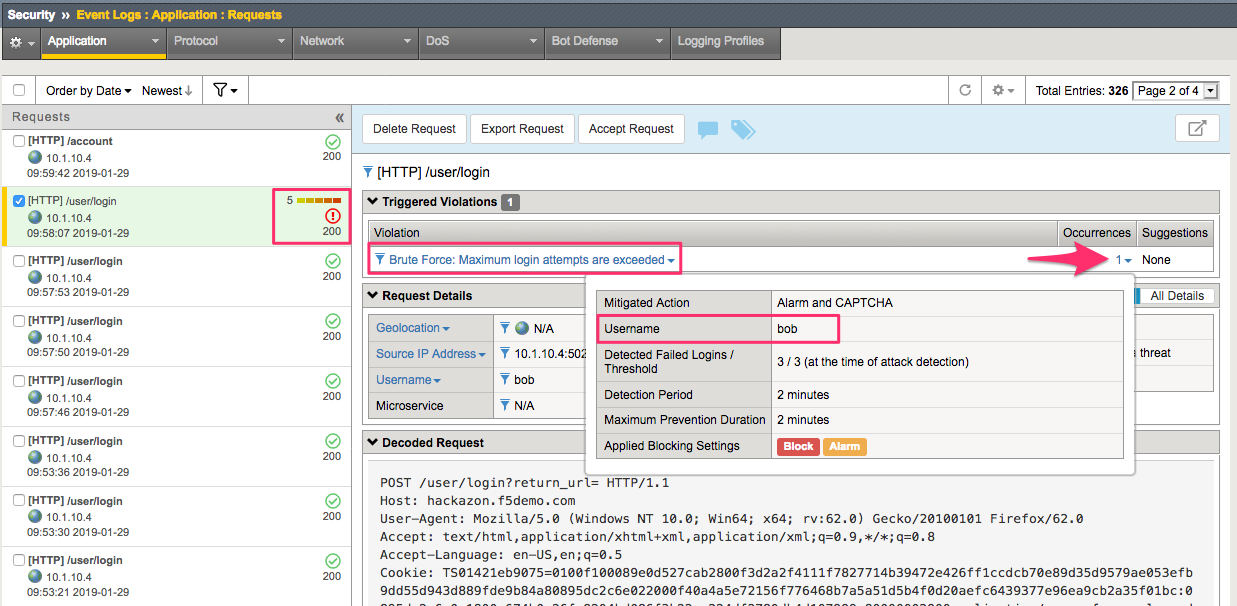
In the BIG-IP browse to the ASM Request log at Security >> Event Logs >> Application >> Requests.
Look through the request log for the illegal request to /user/login.
Note
What Violation was detected for this request?
What other details about this request are visible when you select the “occurrence”?
What indicator is there that this Brute Force violation was detected by username?